Android app reverse engineering with AI: APK to working code
Pull an APK from your own phone, decompile it with JADX and Apktool, hand the tree to an AI agent, and check its answers on a real device.
Decompiled Android apps are large, obfuscated and tedious to read, which makes them a good fit for an AI agent. People have used this to connect home batteries to Home Assistant, recover an undocumented phone API for about five cents, and work out what pre-installed software on a cheap projector was doing. This guide covers the workflow for apps on devices you own, for interoperability, your own development or defensive analysis.
Before you start
- An Android device you own, with Developer options and USB debugging turned on. Android hides Developer options by default; the developer options page explains how to show them.
- adb from Android's platform-tools.
- Java: JADX needs 64-bit Java 11 or later unless you use its
with-jrebundle. Apktool needs at least Java 8. - An agent that can read files and run shell commands: Claude Code, or OpenCode with a model of your choice as in the Kyocera project.
- Cost: the Kyocera reconstruction used 47,573 tokens, about $0.05. Larger apps cost more. Michael Still notes he would not pay to analyse very large, heavily obfuscated apps himself.
Out of scope: bypassing licence checks, root or tamper detection, DRM, or anything that lets an app run in a way its maker blocks. The projects below only read code to understand how an app talks to hardware or to the OS.
Step 1: Get the APK from your own device
The most reliable source is the phone where the app is already installed. These are the documented adb and package manager commands:
adb devices                                   # confirm the phone is connected
adb shell pm list packages vendor             # filter package names containing "vendor"
adb shell pm list packages -3                 # or list third-party apps only
adb shell pm path com.vendor.app              # print the APK path(s)
adb pull /data/app/.../base.apk ./apks/       # copy each path printed above
Modern apps are often split into a base.apk plus split APKs, so pm path may print several lines. Tom Barrasso's Kyocera script ran pm path for each package and pulled every base and split APK. He picked candidates from about 200 packages on a Kyocera flip phone, partly by intuition and partly by asking an LLM.
For system apps that came with the device, the same commands work. Zane St. John listed the projector's packages and flagged the ones whose namespace did not match the vendor.
Michael Still got the Bluetti app from a Play Store mirroring site because Claude could not download it from the Play Store. If you have the device and the app, pulling it yourself avoids trusting a third party's copy.
Step 2: Decompile with JADX and Apktool
Use both tools. They give the agent different views.
- JADX turns DEX bytecode into readable Java. Install it from its GitHub releases, with
brew install jadxon macOS,sudo pacman -S jadxon Arch, orflatpak install flathub com.github.skylot.jadx. - Apktool decodes resources, the manifest and Smali. The current release is 3.0.3. Install it with the wrapper script and jar from the install page, or
brew install apktool.
jadx -d out/jadx --show-bad-code apks/base.apk
apktool d -f apks/base.apk -o out/apktool
--show-bad-code keeps methods JADX could not decompile cleanly instead of dropping them. The JADX README also lists --deobf to rename very short obfuscated names and -e to export a Gradle project. JADX's usage line accepts several input files, plus .apks, .xapk and .apkm bundles. With Apktool, -o sets the output folder and -f overwrites an existing one (CLI parameters).
Smali is worth keeping even when the Java looks fine. Barrasso's whole reconstruction worked from Apktool's Smali output.
Step 3: Set up the agent's workspace
Put the outputs in one folder and start the agent there:
myapp-re/
  apks/            # the files you pulled
  out/jadx/        # Java sources and resources
  out/apktool/     # Smali, AndroidManifest.xml, res/
  captures/        # traffic logs, if you have them
  NOTES.md         # findings, each marked confirmed or inferred
Put a few standing rules in the project instructions (CLAUDE.md for Claude Code): treat out/ as read-only, cite a file and line for every claim, mark anything not seen in code or traffic as inferred, and write findings to NOTES.md. St. John's projector brief had the same parts: the decompiled source, the available tools, a written mission with deliverables, an instruction to think carefully before major steps, a todo list, and hints about where to start.
Do your own first pass if you can. The Emaldo author had already decompiled the app, grepped for BLE UUIDs and noted the API endpoints before he opened Claude Code.
Step 4: Ask for specific things
Broad questions get broad answers. These worked in the projects:
- Reconstruct an API. Barrasso grepped the Smali, found a help screen that called the hidden
KCfpSoftkeyGuideclass, and asked Gemini 3 Flash in OpenCode to "Reassemble" that Smali file into its original Java class, concentrating on the Kyocera APIs it calls. The run took seconds. - Implement a protocol from the client code. Claude Code read the decompiled Bluetti app and built a cloud-to-MQTT gateway in an evening, then a BLE implementation over a weekend.
- Map what an app does. On the projector, Claude wrote its own helper scripts to decode obfuscated strings, mapped the components and traced how they talked to each other.
- Explain obfuscated code. On Emaldo, Claude traced classes with names like
n0.aandn0.bto find which key each message type used.
Ask the agent to write a small client or test, not just an explanation. Running code is what you can check.
Check it works
Test on the real device, and keep a log of what passed:
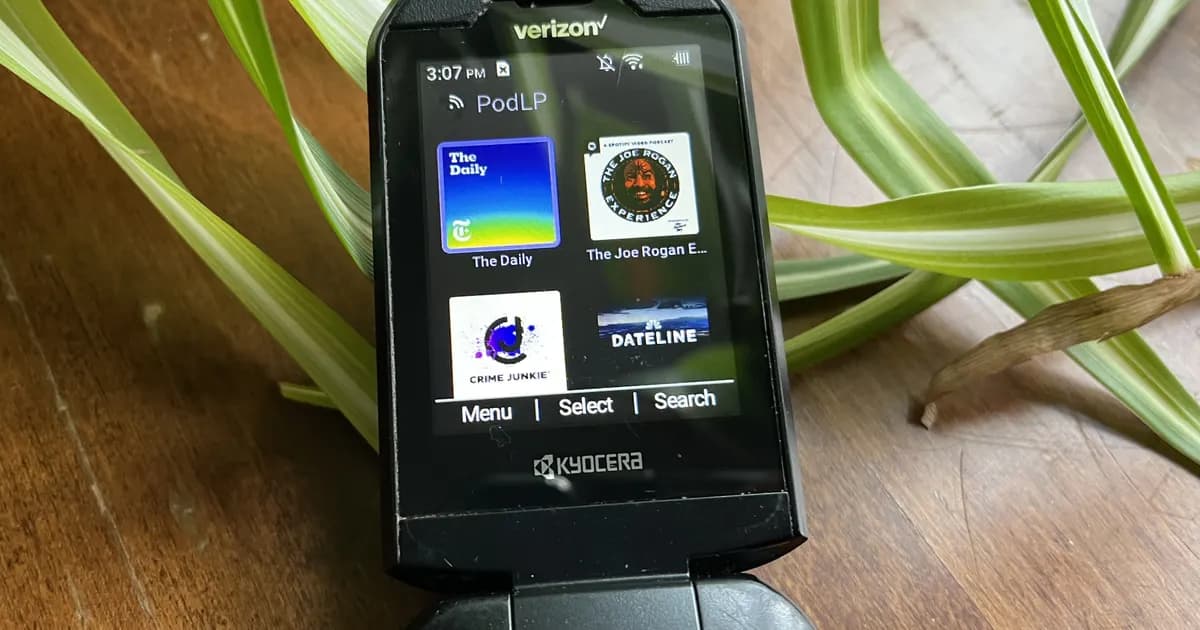
- Barrasso added the reconstructed softkey API to his podcast app, PodLP, and ran it on a Kyocera DuraXV Extreme. A softkey bar that previously stayed on screen after the volume dialog stopped doing so.
- Still's Bluetti gateway had been running for a couple of weeks at the time of his write-up.
- Use
adb logcatwhile you test to see your app's errors and the system's reaction.
For a protocol, compare your client's output against the vendor app on the same device. The Bluetooth guide covers capturing that traffic.
Defensive analysis of suspicious apps
The projector project is a defensive investigation. St. John noticed DNS queries from a new projector on his Pi-hole before he had opened any app. He pulled the pre-installed APKs, decompiled them with JADX and gave Claude Code the source. Claude found that the software enrols the owner's network in a residential proxy service. His recommendations: disable the packages, block the domains at the router or DNS, isolate such devices on their own network segment with outbound traffic blocked, and remember that a factory reset may reinstall the software.
If you do this, analyse decompiled code in an isolated VM, keep the device off your main network, and do not run or share the sample. Static reading is enough to understand behaviour.
Where AI goes wrong
- Stubs that look like code. Gemini's
KCfpSoftkeyGuidemethods were empty placeholders, because the framework implementation was not in the APK it read. Resource labels were guessed, and the listener method was missing until Barrasso searched further. The API had also already been documented by others, so check for prior work (kyocera-softkey-api-gemini-opencode). - Wrong assumptions about the other side. The projector agent's first client assumed responses looked like requests. It fixed this by re-reading the code (android-projector-malware).
- Giving up on crypto too early. Claude only got past Bluetti's authentication after being told to read the decompiled Java harder. It also confused two protocol paths that the app contains for different hardware (bluetti-ep760-home-assistant).
- Trusting the source over the wire. On Emaldo, hours of reading obfuscated code led to the wrong framing. A capture from the real app in an emulator showed the actual format, with method codes byte-swapped relative to the Java. JADX could not display some method names at all (emaldo-home-battery).
Projects that use this
- Bluetti EP760 into Home Assistant: JADX output read by Claude Code, ending in MQTT and an ESP32.
- Kyocera softkey API: adb, Apktool and Gemini in OpenCode for about $0.05.
- Android projector malware: defensive analysis of pre-installed apps.
- Emaldo home battery: decompiled app plus packet capture.
- Amaran lights: Claude Code decompiled the Android and desktop apps on its own.
Further reading
- Android Debug Bridge (adb)
- JADX
- Apktool documentation
- Quickly reverse engineer hidden Android APIs with Gemini and OpenCode
Sources checked for this guide
- developer.android.com /tools/adb
- developer.android.com /studio/debug/dev-options
- github.com /skylot/jadx
- apktool.org /docs/install
- apktool.org /docs/cli-parameters
- opencode.ai
- developer.android.com /tools/logcat
- barrasso.me /posts/2026-01-11-android-reverse-engineering-with-opencode
- madebymikal.com /claude-code-is-scary-good-at-apk-reverse-engineering
- zanestjohn.com /blog/reing-with-claude-code
- medium.com /@ylenius/how-i-reverse-engineered-my-home-batterys-protocol-in-one-day-with-an-ai-pair-programmer-60de36e75df9